Introduction
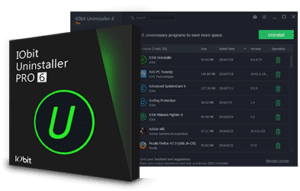
IObit Uninstalller 是一款类似的Windows添加/删除程序,其体积小巧,功能强大,运行速度快,可靠性高。其使用方法非常简单,而且还是一款免费Software.
IObit Uninstaller 是一款功能强大且体积小巧的绿色Software,能够有效地取代Windows自带的卸载功能。通过它,你可以彻底卸载不需要的软件,不留下软件的相关信息,并且不会造成系统崩溃。
Software Features
- Uninstall any program effectively and safely.
- Clean PC and make it faster.
- Remove plugins and toolbars as well.
- Helps you surf safely and quickly.
- Larger databases to eliminate more malware for faster surfing.
- Support for uninstalling over four thousand (4000) inflexible programs.
- Careful and dominant scanning system.
- Uninstall Windows applications at the same time.
- Real-time monitoring.
- Two different skins with large fonts to increase user satisfaction.
- Support different 30+ languages.
Operating Instructions
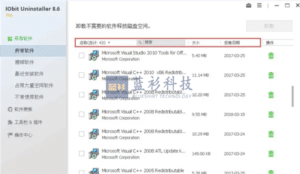
1, open the software, the interface is shown below. In the software interface, support for sorting by software name, software size and installation date, you can also directly search for the name of the software, thus facilitating us to find the need to uninstall the software.
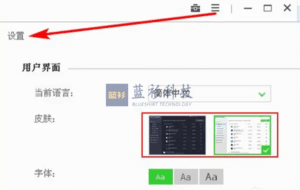
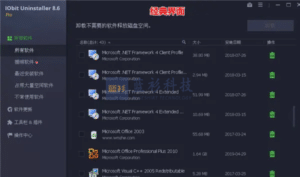
2, the software has two themes: classic and white. Click the three horizontal icons in the upper right corner of the software, select [Settings], where you can change the userinterface, here I choose the white interface, click [OK] button.
3. The following figure shows the classic interface of the IObit Uninstaller software.
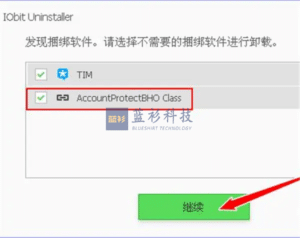
4, select the need to uninstall the software, click on the back of the trash can icon, if the software exists bundled plug-ins, he will also be prompted, here I choose to check the plug-ins, click [Continue] button.
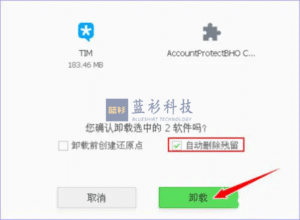
5, then there will be a confirmation of the uninstallation of the icon, in order to uninstall a cleaner, you need to check the "automatically remove residual", click the [Uninstall] button.
6, such as software uninstallation is complete will remove the software residue. Finally, it will be prompted to delete how much registry information, how many files deleted, displayed at a glance.
IObit Uninstaller Notes
system requirements
- Pentium IV with a 2.0 GHz processor or better.
- 1 GB of RAM or more.
- Operating system: Window XP, 7, 8 or 10.
- 100 installation spaces.
- Intel graphics card with standard resolution.
IObit Uninstaller download link
Official website:Download IObit Uninstaller 12 Free - 100% Free Uninstall Programs & Plugins
pro general download link:https://pan.baidu.com/s/1P43waYlOQK-pWS-dFJrS9g?pwd=lskj Extract code: lskj
pro high speed download link:IObit Uninstaller Pro
I'm a blue shirt, focus on sharing: Internet scarce resources & black technology efficiency artifacts
35 Windows must be installed artifacts, you must not be allowed not to know
How can I download documents from Baidu's library for free? - Zhihu (zhihu.com)
Blueshirt Technology - PDF to X v7.0 Software + Activation Code (bluelsqkj.com)
How to find files in a second, enough to last a lifetime_哔里哔里_bilibili
When you buy a new Windows computer, what are the first software you think of installing? - Zhihu (zhihu.com)
PayPal domestic registration guide, only need domestic cell phone number! _beep_bilibili

![IObit Uninstaller Pro usage screenshot[1]](https://nav.bluelsqkj.com/wp-content/uploads/2023/01/QV2Xjf2hYhRLytmI5LxNi6OOWw6F8wB2pApvUR4y.webp)
![IObit Uninstaller Pro usage screenshot[2]](https://nav.bluelsqkj.com/wp-content/uploads/2023/01/CsM7MAWbvT6xmM3e6qw0JlKdhWtHQkh03vdIn5uj.webp)
![IObit Uninstaller Pro usage screenshot[3]](https://nav.bluelsqkj.com/wp-content/uploads/2023/01/pahYAtBvHc59OlrvbIH4pIxnEi3MiM4s0cIKDLBL.webp)
![IObit Uninstaller Pro usage screenshot[4]](https://nav.bluelsqkj.com/wp-content/uploads/2023/01/gJliycnLfSl4WNnczaQw8fdKIscV6GCc0rMmkV0j.webp)
![IObit Uninstaller Pro usage screenshot[5]](https://nav.bluelsqkj.com/wp-content/uploads/2023/01/UHSZxApo5E5TrrrzFGjZBn9ajxrHkX2rozWGO5gO.webp)
![IObit Uninstaller Pro usage screenshot[6]](https://nav.bluelsqkj.com/wp-content/uploads/2023/01/kkgdkBCtPrp2xylRHAsVMs5HVFxvoMePhkOw7efz.webp)
![IObit Uninstaller Pro usage screenshot[7]](https://nav.bluelsqkj.com/wp-content/uploads/2023/01/6AAckbnSAxf5151Y0IYBue7vLNGVFMabScInoKUe.webp)
![IObit Uninstaller Pro usage screenshot[8]](https://nav.bluelsqkj.com/wp-content/uploads/2023/01/JYEdonaMmb1mgI8SmJjvqthorI0kwFk5pH5gFV5B.webp)
![IObit Uninstaller Pro usage screenshot[9]](https://nav.bluelsqkj.com/wp-content/uploads/2023/01/JKS7KjsjgMt9vX08ifqGaXwxgxqLnOTVnAskhR2n.webp)
![IObit Uninstaller Pro usage screenshot[10]](https://nav.bluelsqkj.com/wp-content/uploads/2023/01/VrJJZLLOBdPTmz3htJey1eBLBb4IVNpTSSZzTsr1.webp)
![IObit Uninstaller Pro usage screenshot[11]](https://nav.bluelsqkj.com/wp-content/uploads/2023/01/zDZIVHOhNtRI3lYcToY5Ax4Bcakpw0XmBLcNMsyf.webp)
![IObit Uninstaller Pro usage screenshot[12]](https://nav.bluelsqkj.com/wp-content/uploads/2023/01/AakVzWy1fTTdiAS9KSoLDxl3gUMXPb4FhtsiUAkn.webp)
![IObit Uninstaller Pro usage screenshot[13]](https://nav.bluelsqkj.com/wp-content/uploads/2023/01/YxjR5ifa4z578kgrBdhO69KEKO1ctKkCTl4CiZDz.webp)
![IObit Uninstaller Pro usage screenshot[14]](https://nav.bluelsqkj.com/wp-content/uploads/2023/01/ax36OndE0tQk5mOkjtJy73ZnXXVs0z96vV7ZPchA.webp)
![IObit Uninstaller Pro usage screenshot[15]](https://nav.bluelsqkj.com/wp-content/uploads/2023/01/8DCvhZIwmrlehn85mAPBRybEp3cIXS7lgceSRCfZ.webp)
![IObit Uninstaller Pro usage screenshot[16]](https://nav.bluelsqkj.com/wp-content/uploads/2023/01/ZvZhJYlLIq4sdeejRrhAPCCGohr2lt2MnCnQx7H0.webp)
![IObit Uninstaller Pro usage screenshot[17]](https://nav.bluelsqkj.com/wp-content/uploads/2023/01/86n4YQ0U032nyzDW4fRKTRJwxybpMx8uUmh4IHOP.webp)
 interface, here I choose the white interface, click [OK] button.