
Illustroke
AI SVG vector illustration generation tool
 Microsoft Designer
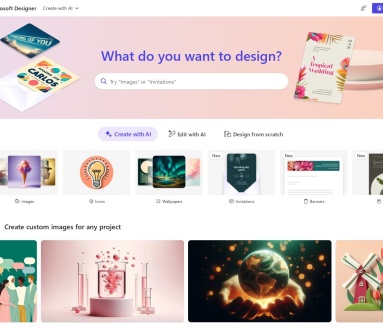
作为Microsoft 365的一部分,Microsoft Designer是一个用于创建任意类型的图像设计的Tools,从标志和邀请函到Blog横幅和社交媒体帖子。你以前可能在Canva、Fotor、Figma或者其他图形设计的软件设计过类似元素,但Microsoft Designer更加的智能。

Microsoft Designer differs from other design tools in that it uses OpenAI'sDALL-E 2Technology. This is an artificial intelligence that allows you to create images and artwork by typing the text description you want. This feature will help you find unique graphics for your project and the images created are very realistic thanks to the advanced technology.
You can also fully customize your visuals using your own images and built-in design tools. With templates, shapes, photos, icons, text styles and color themes, you can explore different looks and get the exact design that fits your project.
Since going live in December 2022, Microsoft Designer requires a waiting list to qualify for access. You can add your email address to the list and will be emailed login instructions once you have been granted access.
The current preview doesn't include all of the planned features, but Microsoft seeks feedback from those with preview access to improve the tool before it's generally available.Microsoft Designer will then be available as a free app for Microsoft 365 personal and home users, with the option of premium paid features. Microsoft also plans to integrate Designer with Microsoft Edge. The hope is to provide Edge users with help when designing social media posts and other items for websites they visit in the browser.
When you sign in to Microsoft Designer, you'll see Designer Copilot, a tool that helps you create your first visual using an AI-generated image, your own image, or a blank canvas.

Simply enter the visual elements you want to create in the input box, such as An Instagram post about my cosmetic product launch on April 1st. and then click Generate, and Microsoft Designer will automatically layout the design. You can also click AI Generate image to generate the elements you want.

This site blue shirt technology to provide theMicrosoft DesignerAll from the network, does not guarantee the accuracy and completeness of the external links, at the same time, for the external links to point to, not by the Blue Shirt Technology actual control, in August 10, 2023 9:54 am included in the content on the web page, all belong to the compliance and legal, the content of the late web page, such as the emergence of irregularities, you can contact the webmaster directly to remove the Blue Shirt Technology does not assume any responsibility.